
MACD Trading Indicator Analysis Buy & Sell Signals
Since the MACD Stock Index indicator uses 26 & 12 EMA to plot, we shall compare these two EMAs with the MACD indicator to determine how these buy & sell Stock Indices signals are generated.
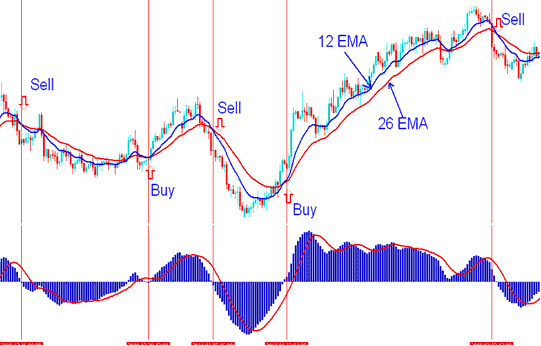
MACD Trading Indicator - Example of MACD Indicator
The MACD Stock Index indicator is a leading indicator meaning it generates Stock Indices trading signals that are leading compared to price action as opposed to lagging indicators that lag behind the Stock Indices price.
Buy Stock Index Trade
A buy Stock Index trade is generated when there is a MACD fast line crosses above the signal line. However, as with any leading indicator these Stock Indices trading signals are prone to whipsaws/ fake outs.
To eliminate the whipsaws it's good to wait for confirmation of the buy or sell Stock Indices signals. The confirmation Stock Indices signal is when the two lines cross above the zero mark, when this happens the buy generated is a reliable Stock Indices trading signal.
In the Stock Indices example below, Moving average Stock Indices indicator generated a buy signal, before price started to move up. But it wasn't until the MACD moved above the zero line that the buy Stock Index signal was confirmed, & the Moving Averages also gave a crossover Indices signal. From experience its always good to buy after both the MACD lines move above zero center line mark.
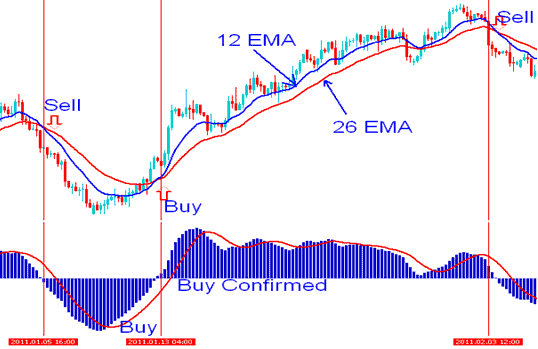
Where to Buy using MACD Trading Indicator - Buy Signal
Sell Stock Indices Trade
A sell Stock Indices trading signal is generated when there is a MACD fast line crosses below the signal line. However, just like the buy Stock Index signal, these are also prone to whipsaws/ fake outs.
To eliminate the whipsaws its good to wait for confirmation of the sell Stock Indices trading signal. The confirmation is when the two lines cross below the zero mark, when this happens the sell generated is a reliable Stock Indices trading signal.
In the Stock Indices trading example below, Moving average generated a sell confirmed after MACD moved below the zero line at the same time that the Moving Averages gave a crossover Indices trading signal.
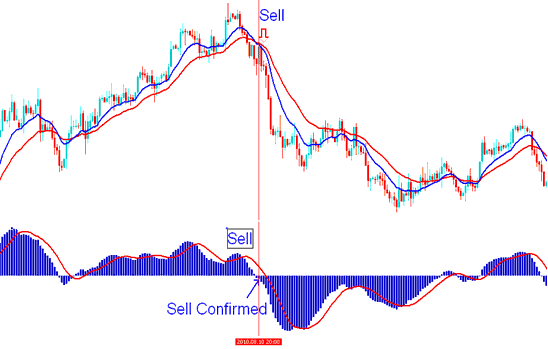
Where to Sell using MACD Trading Indicator - Sell Signal