How Do I Activate a Indices EA on MetaTrader 5?
How to Activate an Expert Advisor in MT4 & MT5 Indices Trading Platform
Steps on How to Activate Stock Indices Expert Advisor in MT4 & MT5 Indices Trading Softwares.
- Select the Tools Menu
- Select The Expert Advisors Tab
- Click the Check Box "Enable Expert Advisors"
- Click the Check Box "Allow Live Trading"
Procedure on how to activate an MetaTrader 4 and MetaTrader 5 EA
Options Settings on Tools Menu on MT4 and MT5 Indices Platform
The options setting button is used for a variety of many different tasks on the MT4 and MT5 indices trading platforms. Option settings button is listed within tools menu in MT4 and MT5 as shown below. The Short-cut key for this - "Ctrl+O".
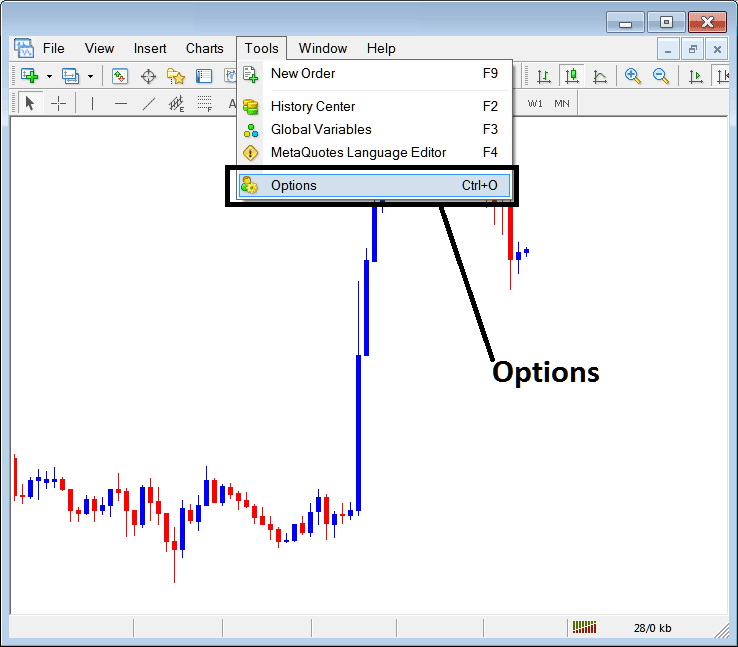
MetaTrader 4 and MT5 Options Settings - Expert Advisors Automated Indices Trading Setup
MT4 and MT5 Options Settings
These settings on the MT4 and MT5 are shown below: the list of various buttons are displayed as tabs as displayed on the image below. As a trader to edit anything on this panel just click on any of the buttons and then change settings.
Stock Indices Expert Advisors Tab
The Indices Platform Expert Advisors panel is illustrated and shown below:
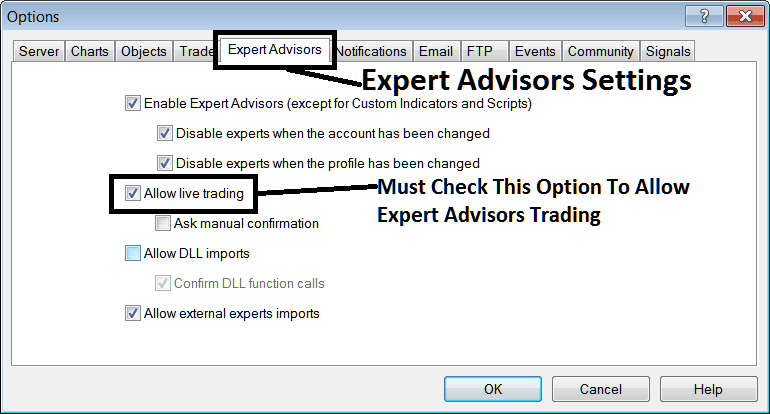
MetaTrader 4 & MT5 Indices Platform - Options Settings for Indices Expert Advisors Automated Trading
The following options are used for Indices Expert-Advisors Automated Trading:
Enable Expert Advisors - Allow for Expert Advisor to be placed on the chart for purposes of automated trading execution
Disable experts when accounts have been changed - login to a different account deactivates Expert Advisors
Disable Experts when profile has been change - When you change profiles the Expert-Advisors setting for allowing trading in new profile is deactivated until you allow and manually place an EA on this new opened stock indices chart.
Allow Live Trading - Give Permission to the Expert Advisor to open trades on live stock indices market.
(Ask Manual Confirmation - no needs for this if you are using Expert Advisors, leave this as it's displayed without checking it.)
Allow DLL imports - Dynamic Link Libraries, which are external, unless this is required this should be left unchecked. (External means that these libraries are referenced from a source external & outside your PC computer, so you should try to be careful with this one)
Confirm DLL functions calls - Exercise manual permission for each & every function call, either allow it or disallow it depending on your trade parameters.
Allow External Experts imports - This is used to allow your Expert-Advisor to reference some data from another Expert-Advisor that is in another place, away from your Desktop PC computer, (External means these EA Indices Trading Robots are referenced from an external source outside your PC computer, so be careful with this option).
MQL5 Stock Indices Expert Advisor Community
The MQL5 forum is a community where traders can find other traders & Exchange Expert-Advisors & Indices Signals with each other.
Traders have to register to this MQL5 Indices Expert Advisors community and can then access services from their MetaTrader 4 or MetaTrader 5 platform directly. To get details on how to access and register in this community, login to your MT4 or MT5 software & navigate to window shown below and follow the instructions.
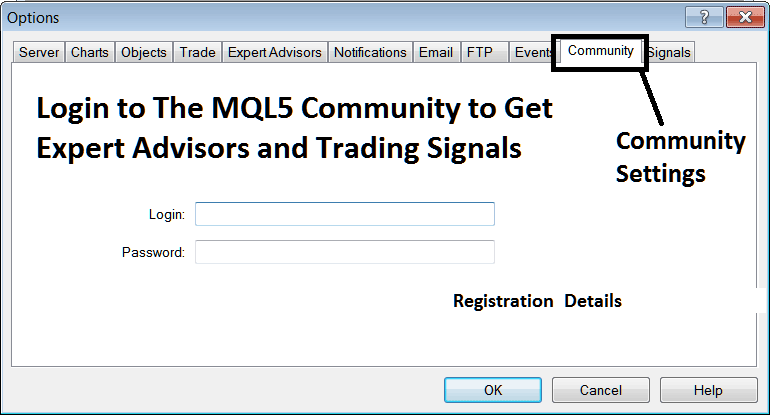
MQL5 Indices Expert Advisor Community - MT4 Robots and MT5 Robots\
