Kaufman Efficiency Ratio Indices Technical Analysis and Kaufman Efficiency Ratio Trading Signals
Developed by Perry Kaufman. Described in his book entitled "New Systems & Techniques".
The Kaufman Efficiency measures the ratio of the relative market speed in relation to volatility. The Kaufman efficiency is often used by Indices traders as a filter to help avoid trading when the stock indices trading market is "choppy" or flat ranging markets. The indicator also helps to identify smoother Indices market trends. This is an oscillator indicator that oscillates between +100 and -100, where zero is the center point. +100 is upward trending market and -100 is downwards trending markets.
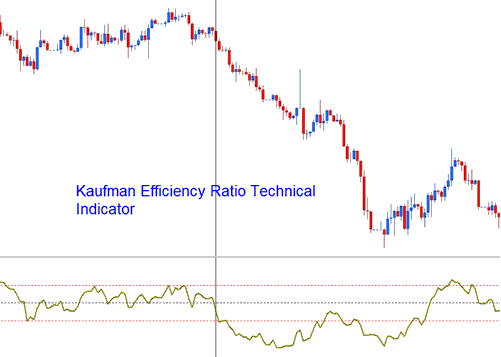
Kaufman Efficiency Ratio
The Efficiency indicator is calculated by dividing the net change in stock indices trading price movement over an n number of periods by the sum of all the bar-to-bar stock indices trading price changes taken as a absolute values over these same n periods.
Stock Indices Technical Analysis & Generating Trading Signals
The Kaufman is used to generate stock indices signals as follows:
The smoother the manner in which the stock indices trading market is trending then the greater the Efficiency Ratio shown by the indicator. Efficiency Ratio value readings of around zero indicate a lot of inefficiency or "choppiness" in the stock indices trading market indices trend movements (ranging stock indices markets).
- If the Efficiency Ratio shows a reading of +100 for indices, then indices is trending upwards with perfect efficiency.
- If the Efficiency Ratio shows a reading of -100 for indices, then that stock indices trading price is trending downwards with perfect efficiency.
However, it is almost impossible for a market indices trend to have a perfect efficiency ratio since any retracement movement against the current trend direction during the time period being used to calculate the indicator would decrease the efficiency ratio.
Bullish/Buy Trading Signal
Efficiency Ratio values above +30 indicate a smoother upward indices trend.
Buy trading signal is generated above center-line mark.
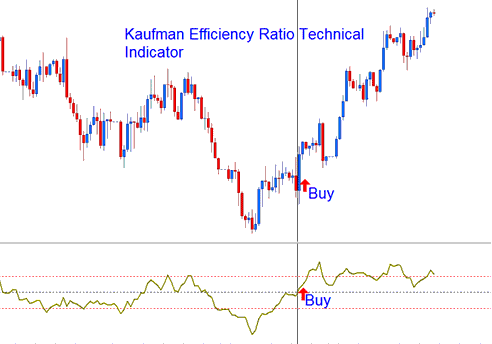
Buy Trading Signal
Bearish/Sell Trading Signal
Efficiency Ratio values below -30 indicate a smoother downward indices trend.
Sell Indices Signal is generated below zero center-line mark.
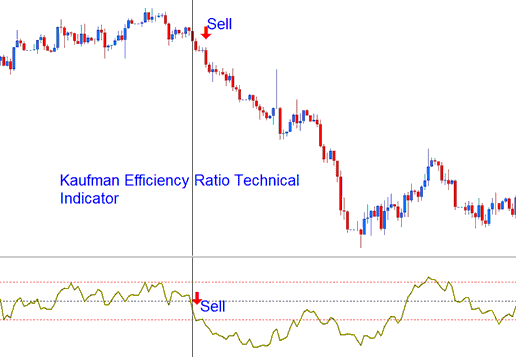
Sell Trading Signal
However, it is good you experiment with other values to determine the most appropriate levels for indices being traded and the value that is the best for your trading methodology that you're using.
