MACD Indices Whipsaws and Fake Out Signals on Bearish & Bullish Territory
Since the MACD technical indicator is a leading indicator that sometimes gives and generates fake-outs, we shall look at an example of a whipsaw fake out generated by this MACD technical indicator, so as to indicate why it's always good to wait for a confirmation trade signal.
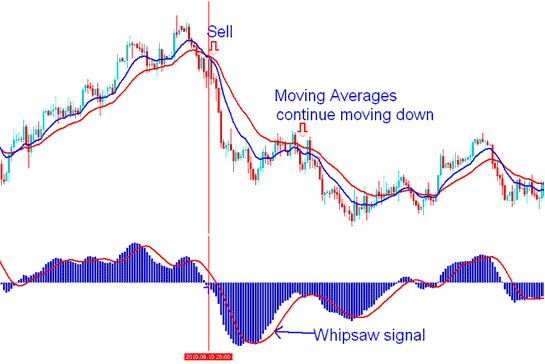
MACD Indicator Trading Whipsaws
The MACD indicator issued a buy signal: however, when this signal materialized, the MACD indicator line remained beneath the zero centerline. At this juncture, the buy signal lacked confirmation, resulting in a whipsaw, as evidenced by the moving averages, which persisted in their downward trajectory.
A indices whipsaw signal is as a result of dramatic rise and fall in the price in a short time and in such a manner that skews the data used in calculating the moving averages that draw the MACD indicator data. These types of fake out whipsaw market signal moves are in general brought about by some economic news announcement which can produce market noise in the short term market movement of the price.
Traders should train on how to develop the ability to gauge a market whipsaw and withstand the whipsaw: a whipsaw fake-out might result into an upswing session and then quickly followed by a downswing session. To minimize the risk of these whipsaws, it's good for you as a trader to wait for confirmation of tour trading signals by waiting out for the MACD indicator to cross above or cross below the zero center-line mark.
Combining MACD Crossover with Centerline Crossover to Prevent Stock Index Trade Whipsaws
Buy signal - A buy signal is validated when there is a crossover, followed by a significant price increase, and then a crossover of the centerline.
Sell signal triggers on a crossover. Price drops sharp, then crosses the centerline to confirm.
1. Buy Trading Signal in Bearish Territory Whipsaw
When a buy trade signal is derived & generated in a bearish territory, it might result into a whip saw especially if it's not followed soon after by a MACD center-line cross-over.
In the scenario illustrated below, despite being in bearish territory, the MACD indicator signals a potential buy trade, but then it declines again, leading to a market whipsaw. By waiting for a crossover of the center line, traders can potentially avoid such whipsaws.
However, in this case, the price briefly crossed the middle line. It would have been hard to trade this fake move using only the MACD tool. That's why it is helpful to use the MACD tool along with another tool. The example below shows how the MACD is used together with moving average tools for trading analysis.
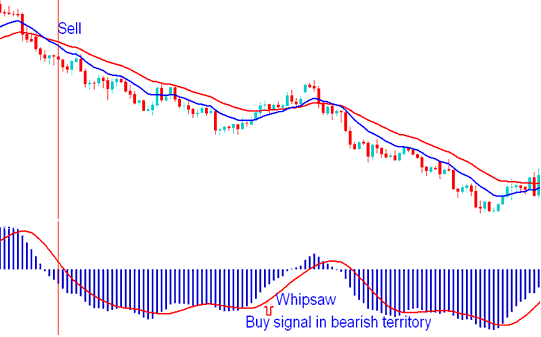
MACD Stock Index Whipsaw - Buy Trading Signal in Bearish Territory
2. Sell Signal in Bullish Territory Whipsaw
When a signal to sell comes up in a positive market, it might lead to quick changes in trading, particularly if a MACD centerline crossover doesn't follow soon after.
In the example explained & shown below, the MACD indicator gives a signal to sell even though it's in positive territory, the MACD indicator then turns up & starts going up again causing a whipsaw fakeout. By waiting for the line to cross over the center it's possible to not get caught by the indices whipsaw. In the example explained and shown below by using this MACD technical indicator with the MA Moving Average Cross-over Strategy you would have avoided this whipsaw.
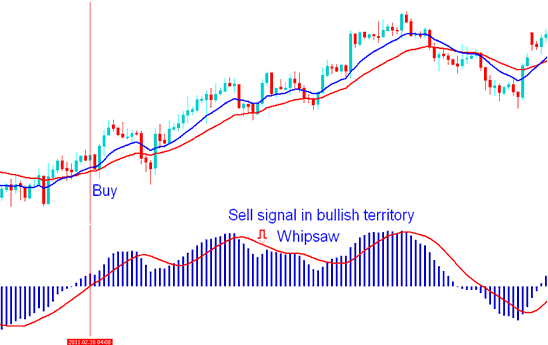
MACD Indices Whipsaw - Sell Signal in Bullish Territory
To completely avoid false signals when trading with this MACD Indicator, it is best to use the Center Line Cross over Signal as the real signal to buy or sell with the MACD.
Study More Guides & Tutorials:
- Transforming Your Stock Index Trade Psychology Mindset To Improve Your Stock Index Trade
- Creating a Stock Index Method To Trade Index with Systems
- Where Do You Get NIKKEI in MT5 Platform?
- How to Get WallStreet 30 Index in MetaTrader 5 App
- How Can I Add AEX in MetaTrader 4 Android App?
- Chande QStick Index Indicator Analysis
- How Can I Add S&P in MT5 Android Trade App?
- MT4 Index Software Platform Meta Editor Tutorial Course
- CAC 40 in MetaTrader 4 Described
- How to Open Stock Index Demo MetaTrader 4 Indices Account in MetaTrader 4 Software Platform
