How Do I Use Stock Indices Trading Sell Limit Trade Order on MetaTrader 5 Platform?
How Do I Trade Stock Indices and Use Indices Sell Limit Trading Order in MetaTrader 5 Platform?
Sell Limit Indices Order in MT5 Indices Trading
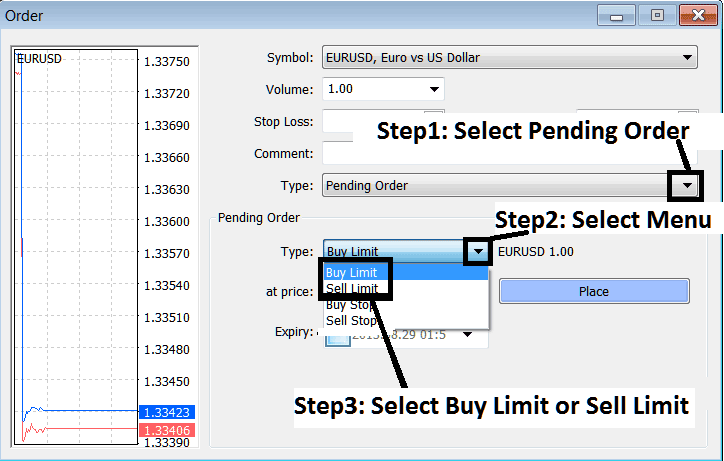
How Do You Use Indices Trading Sell Limit Order in MetaTrader 5?
Setting Sell Limit Stock Indices Orders in MetaTrader 5 Indices Trading
To set up these sell limit orders on MT5 platform use the following procedure:
- Right click on indices trading chart
- Choose "Trading" Option on the Menu
- Then Choose "New" Order Option on the Popup widow that pops up
- Then on the trade setup pop up window panel that appears (illustrated below), under label "Type" choose the option of "Pending Indices Order" instead of "market execution" order
- Under the pending stock indices order options select the pending stock indices order type: for This trade choose "Sell Limit Indices Order" so as to place a pending sell limit order & after which specify the stock indices price at which you want the sell entry limit indices order executed.
How Do You Use Stock Indices Trading Sell Limit Trade Order on MetaTrader 5 Software
