Indices Trading Load a MetaTrader 5 Indices Profile in MT5
How Do I Trade Stock Indices and Load a MT5 Indices Trading Profile on MetaTrader 5?
MT5 Indices Chart Default Chart Work Space - MetaTrader 5 Default Work Space
Open the MT5 platform you wish to create a indices chart profile for. Once you are ready to open MT5 Indices Charts Saved Profile.
- Click 'File' Menu.
- Select 'Profiles'.
- Select "Load Profile".
- Enter the name of "Saved Profile".
Login to the MT5 platform and when you want to load the saved 'My Work Space' profile: You will go to File Menu>>>Then Click Profiles>>>and Then Select 'My Work Space'. In the stock indices trading example explained and illustrated below this Stock Indices Chart MT5 Profile is already selected as shown by the check mark/ tick mark. If you wanted to switch to another saved work space, or the default chart work space or another profile for example the profile marked Swiss Franc or Euro in the above MT5 Indices Chart Workspace example, then you would just click on the name of profile that you want and then load it on the MT5 platform.
Example of how to save a work-space named 'My Workspace'
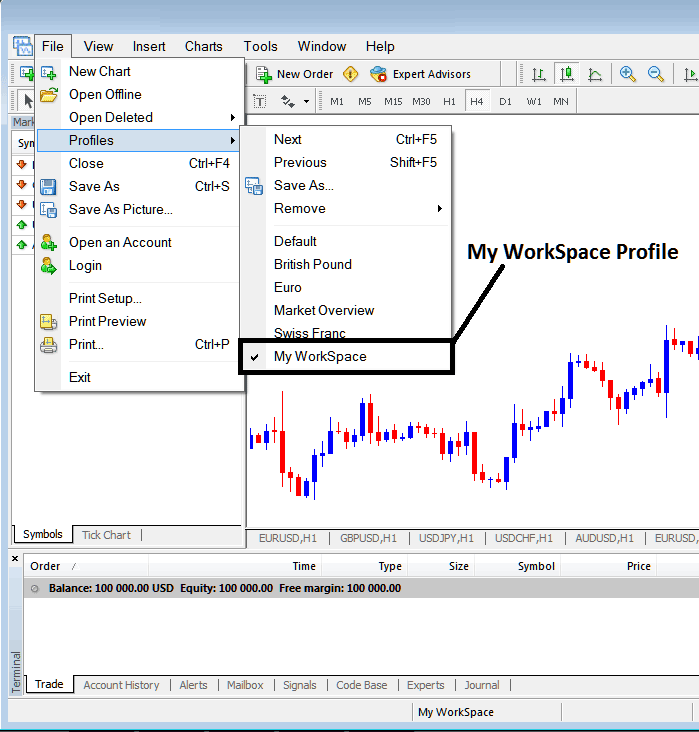
MT5 Indices Chart Profile Work-Space
Loaded work space "My Work-Space" is also displayed at the bottom center of the MT5 software: (below the 'Experts' tab, at the middle bottoms position of the MT5 software as illustrated above).
Another shortcut to load this indices charts 'profiles' is using this button at the bottom-center position of the MT5 platform as shown below.
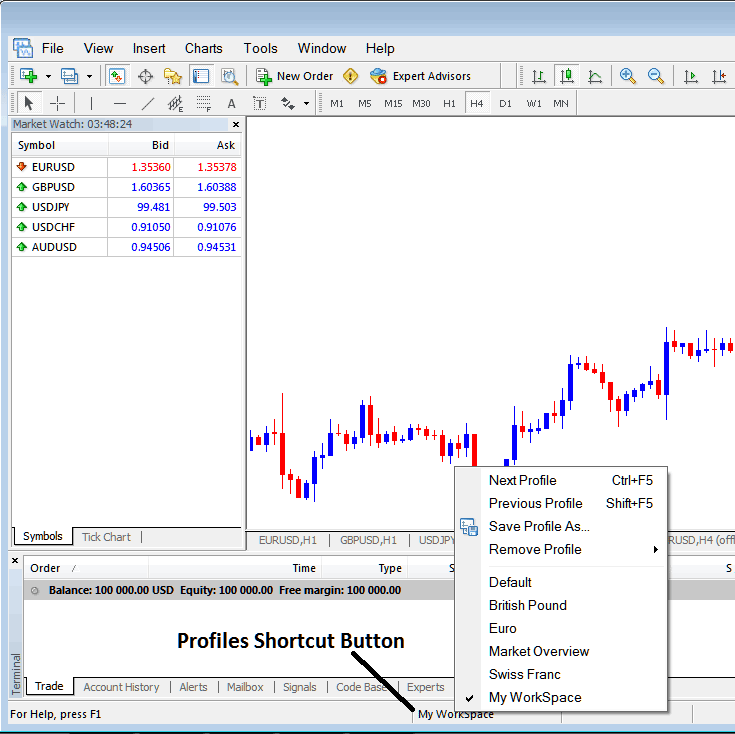
Indices Trading Load a MetaTrader 5 Indices Profile on MetaTrader 5?
From this MT5 platform tutorial, now as a trader you have learned how to load a work space using the MT5 profiles button on the MT5 platform, under the file drop down menu and you can now load any profile you want on yourMT5 softwareby selecting any of the saved profiles on the MT5 platform that you may require to trade with on your stock indices charts.
Indices Trading Load a MetaTrader 5 Indices Trading Profile in MT5
